


Phishing scams have been around almost as long as email has existed. The first recorded use of the technique was in the mid-1990s, when a group of hackers posed as AOL employees and used email and instant messaging to steal users' passwords and account credentials.
For most of the intervening decades, phishing remained fairly easy to recognise. Poor grammar, suspicious links, generic greetings: these were the tells security training taught people to look for. The advice worked, mostly, because the scams were unsophisticated.
That has changed. According to the UK Cyber Security Breaches Survey 2025/26, phishing affected 38% of UK businesses in the past year and accounted for more than half of all attacks experienced by organisations that were hit. Awareness is higher than ever. Rates of attack are too.
And since this blog was first published, the landscape has shifted. The scam itself works the same way. What has changed is how convincing it has become.
What do we mean by "note to self"?
Most email providers let you send a message to yourself from within your account. It appears in your inbox as a note, a reminder you have left for yourself. Useful, ordinary, unremarkable.
Cybercriminals have found a way to weaponise it.
How do note-to-self phishing scams work?
The key detail is that you can only send a note to yourself from inside the same email account. That is the crux of the scam.
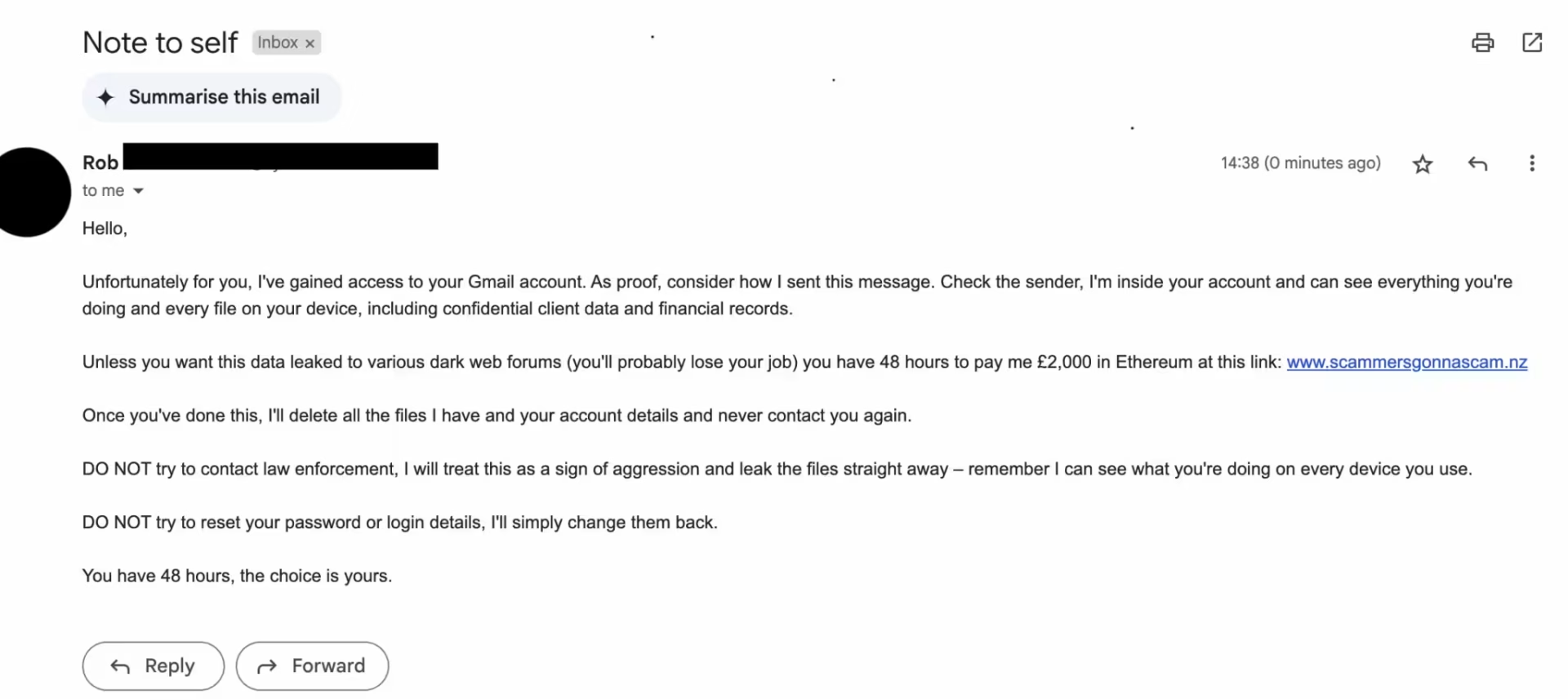
A cybercriminal uses email spoofing to make a message appear to come from your own address, then sends it to you claiming to have breached your account. The email appears, to you, like a note you have sent to yourself. The message typically demands a ransom, usually in cryptocurrency, in exchange for deleting compromising files or data the sender claims to have obtained. A strict deadline is given, say 48 hours, after which the hacker threatens to leak the material or share it with your contact list.
Here is the crucial part: the cybercriminal does not actually have access to your account. There is no compromising data. They have simply spoofed your email address, and are counting on the shock of that to get you to act before you think clearly.
Here is what one looks like;
What is email spoofing?
Every email contains a header: a code snippet that carries information about the message, including the sender, recipient, and tracking data. Cybercriminals have learned to manipulate this.
The sophisticated approach involves forging the fields in the header that the recipient actually sees, making the email appear to come from a legitimate sender. This is possible because the Simple Mail Transfer Protocol (SMTP) that governs email transmission has no built-in mechanism for authenticating email addresses. Sophisticated spoofs can bypass standard email security filters, particularly where email authentication protocols such as DMARC are not properly configured. It is the approach typically used for note-to-self scams, which is what makes them effective.
The more common approach is to register an email domain that closely resembles the one being impersonated, for example CEO@m3gacorporation.com rather than CEO@megacorporation.com. More common, less convincing, and usually easier to catch with a careful look at the sender's address.
What has changed in 2026
When this blog was first published, note-to-self scams were effective primarily because of the panic they induced. The email appeared to come from you, which was alarming enough, but the ransom message itself was often generic and sometimes poorly written.
That is no longer a reliable way of identifying the scam.
According to Hoxhunt's 2026 Phishing Trends Report, which is based on analysis of their own platform data, AI-generated phishing surged from around 4% of all phishing attacks in November 2025 to 56% in December, a 14-fold increase in a single month. By early 2026 it had stabilised at roughly 40%.
The ICO published guidance in May 2026 on protecting organisations from AI-powered cyber threats, outlining five steps in response to a threat landscape that is changing faster than security training has kept pace with.
The practical effect is that the visual tells phishing awareness training relied on are largely absent from AI-generated messages. Perfect grammar, natural phrasing, and plausible context are now within reach of any attacker using a consumer-grade AI tool. Applied to note-to-self scams, this means the ransom message is likely to be fluent and convincing. It may reference your name, your job title, or details scraped from your public LinkedIn profile. The underlying mechanism is unchanged. The email is still spoofed, the attacker still has no access to your account, but the message no longer looks like a scam.
This is why the step-by-step verification below matters more in 2026 than it did in 2025. You cannot rely on the quality of the writing to tell you whether the threat is real.
How to spot a note-to-self scam
The note-to-self scam has a reliable tell that AI cannot remove. Here is how to work through it.
1. Do not panic
If you receive an email like this, your immediate instinct will probably be alarm. That is exactly what the attacker is counting on. Creating a sense of urgency is one of the most common and effective social engineering techniques in existence. Do not pay, do not click any link, and do not delete anything until you have worked through the steps below.
It can help to use the Stop, Look, Think approach: stop before acting, look at what the email is actually telling you, and think critically before responding. Tell yourself that nine times out of ten, this is a scam, not a real compromise.
This is more important now than it was a year ago. AI-generated messages are more convincing, which means the urge to act quickly is stronger. Pause anyway.
2. Check the sender's email address
Does the address exactly match your own? If the attacker has used the less sophisticated spoofing approach, there will be a subtle difference: an extra character, a different domain. Look carefully.
If the address appears identical to yours, it is likely a more sophisticated spoof. Move to step three.
3. Check your sent folder
This is the definitive check, and AI cannot change it.
A note to self can only be sent from inside your email account. If the email in your inbox does not appear in your sent folder, it was not sent from your account. It is a spoof. The sender has no access.
This step works regardless of how convincing the message is. No AI-written ransom demand changes what is or is not in your sent folder.
4. Check the IP address of the sender
If you want additional confirmation, check the sender's IP address. A message genuinely sent from inside your account would carry the IP address of the mail server associated with your email. A spoofed message will not.
To check in Gmail: open the email, click the three vertical dots, and select "Show original."
To check in Outlook: open the email, go to File, then Properties, and look at the Internet headers.
Once you have the raw header, a tool like MXToolbox's Email Header Analyser will parse it and identify the originating IP address.
Note: if you use a virtual private network (VPN), this step will not give a reliable result, as VPNs mask the IP address associated with your connection.
5. Flag it and move on
Once you are confident the email is a scam (and after step three you should be), report it as spam to your email provider and delete it. There is nothing else to do.
Why training still matters
The checks above are straightforward when you know to apply them. The problem is that most people do not.
According to Hiscox's 2026 small business risk survey, 38% of UK SMEs named cyber attacks as the risk most likely to keep them awake at night, placing it above inflation, economic downturn, and legal claims. Yet the UK Cyber Security Breaches Survey shows that staff training rates have not kept pace with either the volume or the sophistication of attacks. Awareness of the threat and knowledge of what to do when it arrives are not the same thing.
Note-to-self scams are a useful illustration of that gap. The scam is completely neutralised by checking your sent folder. But if the first response is panic, that check often does not happen. AI-generated messages are increasingly effective at inducing exactly that response.
Want to know more about how to protect your business from phishing? CyberSmart Learn gives your team the training to recognise attacks and respond correctly, rather than reactively. CyberSmart Phish runs simulated phishing campaigns so you can see how your team actually behaves when a convincing attack lands, before a real one does.
MSPs looking to offer phishing awareness and simulation to clients can access both through the CyberSmart partner platform. Explore the partner programme